Vocabulary review: repeat the words you are learning when they are due
Review helps you remember the words you are learning. Every word you meet in a lesson, a word list, a sprint or a game gets a place in your dictionary and a date when it should be repeated. Open Review and Fluera shows the words that are due today, uses them in new exercises and updates their review schedule based on your answers. Repeat a word correctly on several different days and it is marked as learned and leaves the queue.
What Review is
Review is Fluera’s spaced repetition feature. Instead of a separate flashcard deck that you have to build and maintain, the review queue is filled automatically by everything else you do: a lesson introduces a word, a game tests its meaning, a sprint catches a mistake. Each of those events updates one shared record for the word, and Review reads that record to decide what to show you today.
You do not choose what to review. The schedule does, and the schedule is based on how you have answered so far.
How vocabulary review works
1. Learn words anywhere in Fluera
Complete a lesson, study a word list, play Fluera Tower or run a sprint. Each word you practice has a status: new, learning, needs review or learned.
2. Words become due for review
A word you are learning gets a due date. The first repetition comes a day later, the next ones after longer gaps. The day boundary is your own local midnight, so “due today” means today for you.
3. Open Review
The page shows how many words are due. Start a session and the words come back in sentence and translation exercises, not as bare cards, so you repeat them in context.
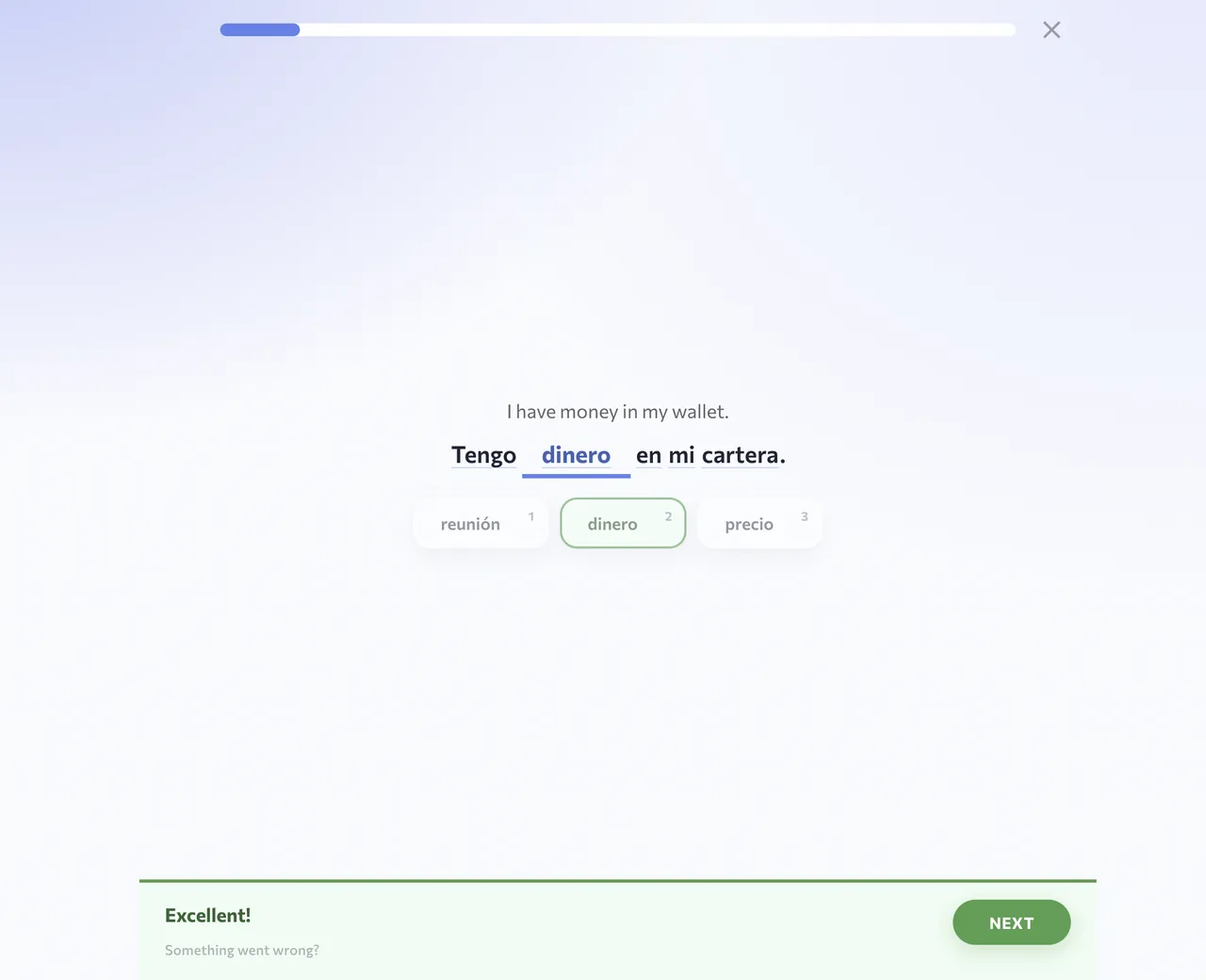
Screenshots show the English interface and Spanish vocabulary; the words and translations in your session depend on the selected course.
4. Answer, and the schedule adjusts
A correct answer pushes the word to the next interval. A wrong answer sends it back to the start of the ladder and into your mistakes queue.
5. Words graduate
After several correct answers on different days a word is marked as learned and stops appearing in Review. Fluera does not keep scheduling endless maintenance reviews; a learned word only returns if you get it wrong somewhere, for example in a game.

What you review
Review covers the vocabulary of every course you follow, English, Spanish or French, from beginner to upper intermediate, plus words from your own lists and imports. If your queue is empty, nothing is due: continue a lesson, study a list or play a game to add words.
Why spaced repetition works
Forgetting is predictable
Review schedules another encounter with a word after a gap. The app uses your answer history and configured intervals; it does not measure the exact moment when you personally would forget a meaning.
Practice recalling meanings
Try to recall a word before checking the answer. Review gives you a chance to respond first, then shows feedback so you can check what you remembered.
See words in context
Sentence exercises show how a word is used with other words, helping you connect its meaning to a real context.
One record, no duplicates
Lessons, lists, games and Sprint share your learning progress. A word marked as learned in one activity is not treated as new in another.
Review and the games
Vocabulary games in Fluera prefer words that are due, so a round of Fluera Run or Fluera Jump is also a review session. A word you first met in a game enters the queue as “learning” and returns here the next day. A learned word you miss in a game comes back for a proper repetition.
On phone and computer
Review works in the browser and inside the Fluera app for iPhone and Android. The daily reminder, if you turn it on, comes only on days you have not studied yet.
Account required
An account is needed for personal review and mistake practice, because the queue is built from your own learning history. A new account may have an empty queue: start with a lesson, a word list or a game to add words. Registration is free.
What an empty review queue actually means
An empty queue means that no words are currently due for this practice in the selected course. It does not mean that every word in the language is learned, and it is not an instruction to create mistakes so that the page has something to show. Some words may still be marked as learning but scheduled for a later day. Others may already be marked as learned and therefore outside the automatic queue.
If you expected a particular word, check its status in your dictionary and confirm the course you have selected. For deliberate practice of that word today, use a list or a selection from the dictionary. Review is the scheduled path; it is not intended to reproduce any arbitrary group of words on demand.
Before answering, give recall a chance
Read the exercise carefully and try to bring the meaning to mind before relying on the answer options. In a sentence exercise, read the surrounding words as well: they show what role the missing word needs to play. The purpose is to revisit the meaning, not merely to recognize a position on a card that you saw a moment ago.
After a correction, take a moment to understand the whole answer. If a sentence still feels unclear, open the word and look at an example before continuing with more new material. A correct choice that you cannot explain is a reason for a closer look, even if the session result counts it as correct.
Repeating today and reviewing on another day
It can be useful to practice a difficult word more than once in the same sitting, especially when you are separating it from a similar word. But repeated answers while the correction is still fresh are different from recalling the word after a gap. Fluera tracks progress across learning days, so rapid repetitions should not be interpreted as several separate days of progress.
You do not need to manage those dates by hand. Use Review when words are due, and use an exact list or dictionary selection when you have a separate reason to practice them sooner. This keeps scheduled review and deliberate extra practice from being confused with each other.
Return after a break without turning the queue into a deadline
If more words are due than you have time for, begin with a session you can complete attentively. Read the corrections and continue only while you can still think about the meanings. Trying to clear a large queue by guessing produces less useful feedback than a smaller amount of careful work. The queue is a guide to what can be revisited, not a requirement to finish everything before you stop.
Delay adding a large new list if the existing vocabulary already needs your attention. Once the familiar words feel more accessible, resume new material at a manageable pace. There is no need to compensate for each day of a break with an extra-long session. Focus on the words in front of you and the next practical action.
Separate recognition from use
You may recognize a translation immediately but hesitate when the same word appears in a sentence. That difference is useful information. Look at the example, the form used there and the words around it. A noun’s meaning does not by itself tell you which verb accompanies it, and recognizing a verb does not mean every form will be equally familiar.
Conversely, a difficult exercise does not make all your previous learning worthless. You may understand the meaning but need to practice a spelling or a sentence pattern. Use the feedback to choose a narrower follow-up rather than treating every error as proof that you must start the language again.
Review, Mistakes or a selected list?
Choose Review when you want the schedule to select due vocabulary. Choose Mistakes when your immediate goal is to correct words you got wrong. Choose a list or dictionary selection when you want control over the exact material, for example before reading a text on a particular topic. The same word can be relevant to more than one of these activities, but the reason for choosing it differs.
When you finish, check whether the words that caused hesitation are clearer. You do not need to open every practice mode to make the session complete. A useful stopping point is finishing the current set and knowing which example, word or topic you want to return to next.
Frequently asked questions
Is review free?
How many words will I review a day?
Can I review words from my own lists?
Why is my review queue empty?
Does Fluera keep reviewing words forever?
Learn words in context
Review repeats words in sentences. For new vocabulary, examples and audio, continue with a word list or a language course.
Learn words in context · Learn Spanish · Learn French
More ways to practice
Work on mistakes · Vocabulary Sprint · Games for learning languages · Vocabulary practice